Adversal 728*90

Wednesday, June 5, 2013

Leaks Collection: Nokia EOS

In case you've been hiding somewhere and missed all the Nokia EOS action that went down today, here's a quick recap of all the juicy pics you missed out on. First off the EOS comes with a HUGE-ASS (yes I'm allowed to say the "A" word) camera module/sensor on the back to house all its imaging goodness (rumored to be 41 megapixels).

Of course a huge sensor means that inevitably there will be a bump/hump on the back of the device, of which there is plenty. However Nokia have gone with a circular hump design 9similar to the 925's) rather than the rectangular look of the previous camera kings, the N8 and 808.

To recap on the rumored specs of the phone why not watch me tell you all about it, in video mode :O


Without further ado, the rest of the pictures:


Via GSMArena, MNB and WPDang

Saturday, June 1, 2013

The Best Maps to Help You Navigate the Game of Thrones World While Reading/Watching

One of my greatest problems while reading the Songs of Fire and Ice Series (as a book reader I hate referring to it as "Game of Thrones"- unfortunately few people seem to know the true name of the series); is the fact that besides the countless characters making it almost impossible to know *exactly* what's going on (at least until your memory is jogged by the first few paragraphs of each chapter) I had no grasp of the world's geography. A condition made even worse by the fact that I'm reading the books on my kindle; meaning I don't have that useful map at the start of my books (nor the luxury to flip back and forth to it). 

In my deluded mind I had always assumed the layout of the world (which I can't seem to find a real name for) was similar to a map of North America, with Canada representing all that's north of the wall (is that racist?). 

Which is exactly why my mind was blown when I saw some maps of the kingdom, it turns out the "Seven Kingdoms/Westeros" are really a thin vertical strip of land, and not the wide sprawling from New-York to California mass that I had in mind. What troubled me most was trying to get a grasp of where * CAUTION! SPOILERS FOLLOW!*  Dany was conquering and freeing slaves in relation to the kingdoms. Specifically as to trying to predict exactly which part of the kingdom she would attack first once she crossed the Narrow Sea. ( I'm currently 80% into book 3/ "A Storm of Swords" so anything can happen... )

So enough of my blabbering, onto some of the greatest maps to help you understand your storyline better (hopefully you're reading the books, as they seem to be a million times more amazing than the show). Unfortunately the world doesn't have a full map that covers future cities and past (as the author can at any moment add another city to Dany's conquest perhaps) but here are some helpful visual aides:

Besides the one above via A Life in Equinox, which gives a decent representation of the 7 kingdoms, as well as the respective lord/king of each area, there is a full scale interactive map which also allows you to follow the conquests, campaigns and movements of each character from http://quartermaester.info/

Also available are the official maps of the story from Fantastic Maps which you can also purchase full size wall posters of at Amazon:


Also this unofficial map is quite useful, and possibly the most up to date of them all?

So that's pretty much it, hope you guy found it useful, and I'd love to hear your thoughts on the story so far (regardless of whether you're reading the books or watching the show), and do share who you're favorite character is.

*Oh and if anyone here has read the books AND watched the show then let me know if you've noticed any major discrepancies in the story lines? So far my biggest issue (without watching the any of the show) is how Renly and Loras are so obviously gay in the TV show, while the book does nothing more than subtly hint at it (3 books in).

Cheers :)

Thursday, May 9, 2013

Microsoft has Finally Gone Insane; Loses Touch With Sensibility in the Latest Group of Ads

Many have been calling for a drastic change in Microosft management, especially with the whole hate/hate issue with Windows 8. Apparently someone at Microsoft misread those messages to mean that they should create a group of completely insane advertisements that make lose to no sense at all, but hey you be the judge? Crazy or Hot?

First off Butt Ping-pong:

Then ridiculous Makeup show with hand banging

And finally the only that probably makes any sense "Finger in Watermelon" 

Wednesday, May 8, 2013

FAQ: How Unlocking/Jailbreaking/Enabling Sideloading Affects your Windows Phone

A while back I posted about how to install apps from outside the marketplace onto your Windows Phone 7 or 8 device, in case you missed it check out the posts down below (plus videos!)

Step by Step Instructions can be found HERE


I constantly got some questions regarding how this would affect users devices in terms of support, updates and others; so here;s a quick run down.

To make things clear enabling a developer unlocked account on a Windows Phone is completely legal, and allowed; it doesn't "hack" your phone in any way, it simply allows your Live ID to install unauthorized apps through your PC rather than only allowing marketplace apps.

Will this affect future updates on my Windows Phone Device?
No, your WP device will continue to receive software and application updates as before (however side-loaded apps CANNOT be updated though the marketplace).

-Will this in any way "brick" my WP device?
Absolutely not, as mentioned this is a completely legal and safe process, so don't worry.

-Will this work on my XXX Windows Phone?
YES! This process works on ALL Windows Phone devices, regardless of the OS (7.0/7.5/7.8/8 etc.) or manufacturer (Nokia/HTC/Samsung/ZTE etc)

-Is this process reversible?
Although there is no need to "reverse" the process since nothing is changed it is indeed reversible.

-Will this void my Warranty?
No, technically your hardware warranty should still be active, since you're not modifying the software in any way; however some beta apps may lead to bugginess on your WP device, so install your apps carefully.

-My device says I've reached the app limit, what now?
The free .edu developers account has a maximum limit of installing 10 side-loaded apps at once, there is no way around this; the only solution is to delete an app and replace it with another.

-Is this a permanent solution?
Sort of, your Live ID needs to verify the .edu account it's linked to every year; meaning as long as you have a working .edu email address you won't have any trouble, you may be prompted once a year to re-verrify your .edu email.

-Will this affect my battery life, phone performance, speed etc. ?
Absolutely not, as mentioned before; some beta software however may increase battery drainage.

-What if I purchased a new Windows Phone device?
As mentioned the only thing modified in this process is the Live ID; meaning that once you sign into your new WP device with the same Live ID you can instantly side-load apps, without having to repeat any of the steps. 

-What type of PC/Operating System do I need?
For Windows Phone 7 Devices any OS is fine, for WP8 devices you MUST have a Windows 8 PC capable of running the Windows Phone 8 SDK

-What if I have a Mac?
Tough luck, the process requires a functioning Windows device (see previous questions). 

-I don't have a .Edu email address, what can I do?
Unfortunately not much; there is no other option, short of asking a friend to use his/her .Edu email. Sorry. 

-What sort of App files can my WP side-load?
the WP app format is .XAP (pronounced Zap)


-Where can I download pirated games?!
Don't, support app developers. Download Beta software and tweaks from the XDA developers blog

Thursday, May 2, 2013

In Depth Look at the Compltely Re-Designed Facebook Beta for WP8


Microsoft have put a lot of work into their latest baby, a completely redesigned Facebook app for Windows Phone 8. One that admittedly loses its Metro roots a "tiny" bit, but trust me it's for the better, as the saying goes; "Function over Form".

The new app brings loads of new features to the desperately lacking Facebook app. Mainly the ability to now share other people's status updates and posts; also included is the new layout which brings swiping to the right for your "dashboard" and to the left for your online friends available to chat.

The app also has its own spin on comments by posting the most recent comment at the top of the page, with the eldest comment at the bottom; which may seem a bit dissorrienting at first, but is pretty awesome. The app also brings the much needed "pull to refresh" option throughout (including messages, notifications, friend requests and the news feed of course).

The app however is still in an open beta mode, meaning anyone can download it; but you just won't find it in the marketplace. You'll have to use a direct link, which thankfully I was thoughtful enough to include in this post. Enjoy :)
QRCode

Tuesday, April 23, 2013

Video: Official Tumblr App for WP8 Released

A lot of you out there are big Tumblr fans, and for good reason; where else can you get your fix of crazy Gifs, cool pictures and inappropriate comments (besides reddit). Well the official Tumblr app for Windows Phone has finally been released, and it's pretty damn awesome!
The app comes with a simple clean interface that allows you to switch between your dashboard/feed and the explore page. Coolest fact of all is that Gifs play instantly on both while scrolling! (check out the video if you don't believe me).
The app is extremely smooth and well written and has a feature unavailable on any other platform, the app can change your lockscreen (and the live tile) to match the latest images from your Tumblr feed!
Grab the app for free from over here:
http://www.windowsphone.com/en-us/store/app/tumblr/ffa2fb4f-61b2-4075-ac7b-488846998b72?appid=ffa2fb4f-61b2-4075-ac7b-488846998b72&signin=true

Saturday, March 30, 2013

How Anyone Can Gain Access to All Your Passwords; Without Typing a Single Line of Code

Just because you never give your friends your Facebook password doesn't mean your account is impenetrable; personally I've accepted the fact that no account is safe, no matter what measures you take. However there's a very simple way to hack/access anyone's email, Twitter, Facebook, YouTube (and any other online service you can imagine) without typing a single line of code.

All that's needed is about 30 seconds of access on your "friends" laptop; and from there countless amounts of information is instantly accessible. Sure we all like to keep our laptops and PC's close; but how many times has a friend asked to "google something real quick" or check their email? Just because you sign out of your accounts doesn't mean you're safe.

The real danger is Chrome's "auto-fill password"; and I'm not talking about the risk of having your friend simply click "log-in" on an already filled out form, there's a very simple way to view all your passwords and usernames in plain text; and it's frighteningly easy.

Chrome's auto-fill saves me loads of headaches, when trying to remember which password goes where; but it's also a security nightmare. By simply heading into the settings (of a computer with auto-fill enabled- and most people have it enabled) you can view each and every single password plus the username.

In Chrome head to settings (the wrench icon)> Show Advanced Settings > and hit Managed Saved Passwords (or just type this into the browser: chrome://settings/passwords ). From there every single password and username for any site you've ever saved is visible; in plain text (hit "show" next to the hidden password to see in plain text). This is all accessible without being prompted for a single password, or security authentication.

The moral is, either turn off Auto-fill passwords, or watch who you give your laptop to; stay safe stay secure.

Wednesday, March 27, 2013

Video Demo of Temple Run on WIndows Phone 8 (Lumia 920 Demo)


Temple Run has finally hit the Windows Phone 8 marketplace, so here's a quick overview of how it looks! Off the top the gram is pretty smooth and runs nicely, in fact I don't see why anyone is complaining; the graphics look just fine.
The "bad graphics" people are complaining about is probably because they've gotten used to the newer better graphics of Temple Run 2. According to most people the graphics are pretty much the same of those from iOS and Android.
What do you guys think?
Grab temple run for your WP8 device from here: http://www.windowsphone.com/en-us/store/app/temple-run/1a7cb5f8-792a-4992-b07a-83874c0795ae

Friday, February 8, 2013

Hitman Absolution: First Look & Thoughts

 Hitman Absolution; the latest edition of the hit Hitman series (see what I did there?) released last November is a pretty cool game; here are some quick thoughts about the game.
 First off, I haven't played any previous version of the game, so I'm completely new to the story line/the whole agent 47 deal. Getting into the story was quite simple, as the tutorial was instructive yet not overly boring. The controls were a mix between predictable/usual and awkward positioned; such as the insistence to use the "Q" button at random times; and the lack of consistency between whether "E" is to interact or "F".
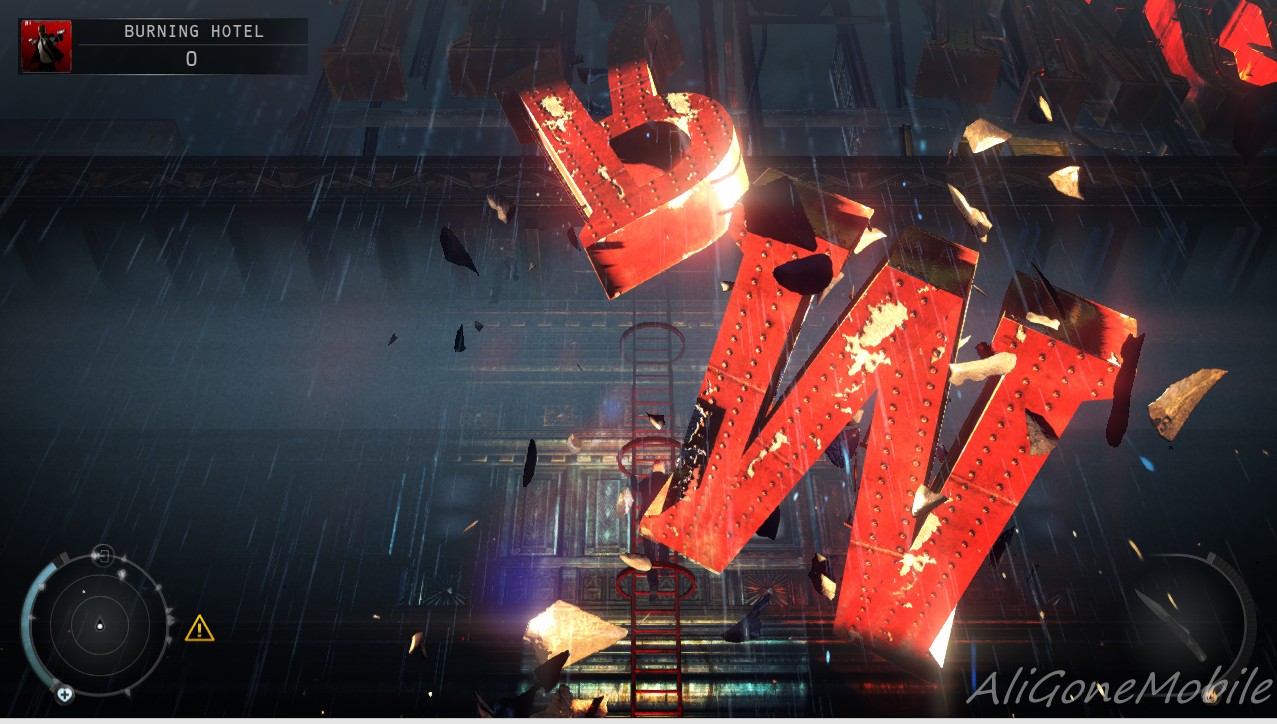
 More importantly on the graphics side the only word to describe them is "stunning". Seriously, the screenshots taken below are running on medium quality on my "decent- but not gaming performance laptop" so I can't help but smile when I think of what the highest setting looks like.
The work rendering itself reminds me most of Batman Arkham Asylum/City as it has the same general look and gloom; and slight softness to people; but of course Hitman Absolution is not an open world game.
 From an actual game-play point of view I was surprised by the fact that there is no strict way to complete the level, there are multiple different ways to take down your targets, all while changing your wardrobe a couple times to blend in with the crowd. Each costume you obtain gives you access to certain privileged locations, and will decrease/increase suspicion from certain people (mainly increasing suspicion from the group of people you're impersonating).
 The game has a scoring system throughout which tracks your progress and adds/deducts points depending on how you compose yourself (deductions for: unnecessary killings, getting spotted, killing civilians etc; points granted for: Hiding bodies, Head shots, completing objectives etc.). Gaining points/rank will unlock abilities that increase Agent 47's skills; such as the ability to kill faster, reload quicker or sneak around quieter.
All in all so far the game is pretty cool, the story line isn't boring at all; but it's just missing that one "X" factor; the simplest way to put it is that I have no compulsion to carry on to the next level once I complete the one I'm playing. What I'm trying to say is that I'm yet to get "sucked in to the game" which is great for my mom and those who want to me to constantly run errands; but not so great to the gamer inside.
But those are just my own two-cents, feel free to drop your own down below.

Thursday, January 24, 2013

The Only Real Alternative To Installous You'll Ever Need

Ever since Hackulous shut down taking installous down with it, people have been on the search for a proper alternative for installous. I've read countless articles talking about VVShare and App cake; well let me spare you the trouble THEY SUCK!
VVShare? With its fancy "Direct Downloads" guess what the speeds don't go over 50 kb/s (that's if you're lucky) and it restarts constantly for no reason at all; making it a nightmare to use even to download the simplest of apps.What about AppCake you say? You mean besides the horrible bugginess that causes it to crash every 5 seconds, and the non responsive built in browser which takes forever to redirect you to a third party hosting site? How about the fact that it doesn't even download the files properly? Rather than go on and raise my blood pressure even more, and risk ending my life before completing this article; I'll go ahead and tell you the one app that you'll need.

One word: Zeusmos. Zeusmos is your all in one replacement for installous; it comes with a clean layout, responsive UI and is actually in fricken English!!! The app supports searching for IPA files online and downloading them from 3rd party hosting clients (just like installous did), you have all the same functionalities (even the same captcha generator) so without explaining myself any further get Zeusmos.
To install Zeusmos simply go to Cydia and add "ihacksrepo.com" to the sources; after that search for "Zeusmos" from within Cydia and install it.

All done, enjoy your slightly less stressful life and thank me anytime.