Adversal 728*90

Thursday, August 23, 2012

Acessory Review: Belkin Verve Foilio Case for iPad

Case Front doubles as a Stand to prop the ipad in Portrait mode
Today we're taking a look at one of the more stylish accessories available out there; the Belkin Verve Folio case for the iPad 3/2. The awesome people at Mobilefun.co.uk hooked us up with this review unit, so be sure to check out their huge selection of iPad cases (and other devices).

The case it self although designed for the iPad 3/New iPad will comfortably fit the iPad two as they have nearly identical dimensions and all the ports are in the same position.


The Foilio case has a very nice premium feel to it (it's not leather, but who cares?), the inside of the case is made of a soft lining (possibly suede?) that provides a comfy layer of protection for the iPads glass (and can double out as a pillow in case of emergencies).

Since the outside of the case is made of black cloth it does tend to gather some dust (visible in the picture above) but that goes away with a gentle rubbing with your hand so nothing to worry about there.


The iPad is held in place by 4 leather straps on all 4 sides of the case giving it a secure and comfortable fit, and without having to worry about scratching the iPad with plastic clamps.


The case itself can be clamped shut by snapping the rubber grip around the case, or can be flipped around the back to hold the cover out of the way while using the iPad. When not in use the grip is hidden on the inside of the case keeping everything nice and tidy. All the while keeping all ports and buttons and the camera easily accessible, so no need to take off the case to charge your device or listen to music.

All in all the Belkin Verve Folio case is a wonderful case for someone looking for a stylish case that offers premium protection, the only downside I can think of is that the case is not Smart cover enabled, meaning your iPad won't turn itself off when opening and closing the case, but besides that the case is pretty awesome and personally I think it's well worth the £24.99 price tag.

If you're interested in getting one be sure to check it out at Mobilefun.

Thanks for reading, feel free to leave your comments down below; also let us know is the lack of Smart cover option a dealbreaker for you?


Easily accessible ports

Saturday, August 18, 2012

Eid Mubarak World!


Eid Mubarak people of earth, all races and all religion. One of the most impressive things I've seen is the lighting of the Empire State Building in Green to honor the commencement of the month of Ramadan, and to celebrate Eid,

Thursday night marked the first time the all-green lighting was used to mark the kickoff of Eid-al-Fitr, a three-day celebration for Muslims around the world.


That's really it, nothing more to add;  enjoy your  Holidays brothers and sisters.

Tuesday, August 14, 2012

$199 Surface RT! Hell Yes! But is There a Catch?


Microsoft Surface tablet release date confirmed for October 26th surface 05 650x365

Most of us who care about technology have already seen (and fallen in love with) the Surface tablet by Microsoft, the design is breathtaking, the simplicity astounding, and the ultra thin keyboard is genius. For a while now speculations about the price have gone up as high as $700 for the base 8GB RT model, however today some very interesting rumors have popped up stating that the Surface RT (running the lite version of Windows 8) could cost as low as $199!!!

Obviously this is awesome news for anyone hoping to snag one of these beauties; personally even though I thoroughly enjoy using my iPad I would pick one of these up in a heartbeat if this price turns out to be true. My mind has already started calculating what color would be the smartest choice, I'm thinking a black keyboard, or maybe white, but definitely not Cyan or the other colors simply because they're dirt magnets. Alas once again I've gotten ahead of myself, so back on topic.

What could this low low pricing mean for the tablet world as a whole, and for Win8 OEMs specifically? First off forget the Kindle Fire, forget the Google Nexus 7 this will be the "game changer" and it really will be one. Unlike the other two tablets I mentioned which were built on a budget in mind (the Fire more than the Nexus 7) the Surface RT obviously had no expense spared. The pop-out stand is a stroke of genius showing exactly how much thought went into this beauty. The other major difference to be pointed out is the fact that the Surface carries a whopping 10.6" screen a monster compared to the two 7 inchers, which would also make the Surface one of the cheapest 10" tablets ever made (Chinese knockoffs aside).

So we've established that the Surface at this price would demolish any other similarly priced tablet and give the iPad a VERY good run for its money, but what about those other poor OEMs who had oh so great plans for Windows 8? First of all make no mistake about it, this is a nasty move by Microsoft; after all who can hope to compete with those folks from Seattle on their own OS (hint: Microsoft is based in Seattle). I'm sure most of the major OEMs out there who have licensing deals with Microsoft are taking a good long look at their strategies, cause you see as big as an advantage as owning the OS your manufacturing for is that's nothing compared to the advantage you gain when you don't need to make money off selling your product.

Yes, Microsoft could be selling these Surface tablets for a $200 loss a pop (highly unlikely) and they'd still come out smiling, simply because they don't need the money right now. All Microsoft really want to do is establish a foothold in the tablet market, make those iPad fanboys think twice before lining up a week before the next launch. The Surface is a great way to get Windows 8 (RT and full Windows 8) out in the wild, making it an afterthought of the purchase (which was driven by the insanely low price) rather than a major contender in the decision. Then of course Microsoft would still have their trump card that no other OEM developing for them has, 30% Marketplace share. Yes, for every dollar you spend in the Marketplace big ol' Redmond gets 30 Cents, not much but what about those expensive apps? Photoshop can run up to $700 for the full version, pretend the Surface RT version would only cost $50, Microsoft would make $15 per license sold and those can add up very quickly. It's basically the same game Sony plays with their PlayStation devices, selling the console for a loss, but knowing that the consumer has no choice but to return to them to actually make any use of the product.

Basically if Microsoft chooses to go down the aggressive pricing path they could sell the Surface by the boatload, but is it worth risking their carefully crafted alliances with their OEMs? Well that's up to Steve Ballmer.

The title of the article asks "if there's a catch?", Sure there is, but not for you; for every other OEM out there definitely, for Microsoft absolutely; But as far as you the consumer is concerned (I assume Ballmer isn't reading this article) by all means go crazy, because this is the future for a couple hundred dollars cheaper.

Thursday, August 9, 2012

Random Useless Fact: A Single Day on Venus is Longer than a Full Year on Venus

http://www.universetoday.com/wp-content/uploads/2009/08/venusmagellan.jpg

"Random UselessFact" is exactly what it sounds like, just a random fact that although useless is hopefully pretty cool.

Quick trip to your 3rd grade Science class, how do you define "a year"? If you said 365 days then sadly you're mistaken, after all what's a day? According to Science:

One Year: Is a single rotation of a planet around the Sun.
One Day: Is a single rotation of a planet on it's own axis

Venus being one spot closer to the Sun then Earth means a rotation around the sun is a tad bit shorter, 225 Earth days to be exact, while a day on Venus is a whopping 243 Earth days. Which is why a day on Venus is longer than a year on Venus.

Pretty cool huh? Share your thoughts down below.

Wednesday, August 1, 2012

Why Bing Desktop is Awesome


I know, I know.... A lot of you read that and laughed, how can Bing possibly be any good? The same people trying to get the phrase "bing it" to become a thing, yeah ok their search services pretty much suck. Well I'll tell you why; simply because their "photo of the day" is AMAZING. Think I'm talking nonsesne? Anybody who's used a WP will tell you that one of the coolest features on it is the background of the search button, that changes daily to match that of bing.com


The photos are beautiful shots from around the world, whether your a photography fanatic or not you're sure to appreciate the beautiful views and breathtaking sights. If you go to bing.com or open the Search on your WP a little "info" icon in the bottom corner will provide you with information about the photo.


Still not convinced? well it's free.... ;)

Get it here: http://www.microsoft.com/en-us/download/details.aspx?id=29281

Monday, July 30, 2012

Microsoft Confirms SW Upgrade for Touch Mouse; Brings Windows 8 Support!


Just the other day I mentioned how excited I was to try out the touch mouse on Windows , well Microsoft have officially announced that the update is coming, SOON! for FREE!

Here's a list of the functions to be supported:

  • A one finger swipe will allow you to move side to side or up and down, shifting content on your screen.
  • Two finger movements manage apps, allowing users to display Windows 8 charms, switch through open apps and show app commands.
  • Three finger movements will let you zoom in and out.
  • Thumb gestures navigate backward and forward through apps.


VIA

Thursday, July 26, 2012

Microsoft Mouse Gestures Reviewed


A while back I posted a couple pictures of the "Microsoft Touch mouse" and promised you a full coverage of the functions/gestures supported; well here it is.

As soon as you connect the mouse to your Laptop/PC it automatically downloads the drivers (no need for those pesky CDs) as well as a tutorial program that teaches you how to use all the mouse gestures.

The groove down the middle separates the mouse into left and right side for right button/left button clicks.

The basic gestures are:
  • Single Finger Scrolling- Just dragging a single finger up or down scrolls across the page
  • Two Finger Panning Up/Down- Dragging two fingers upwards or downwards toggles between Full screen and windowed mode (maximize/minimize), while two consecutive swipes downward of a maximized window will dock it into the taskbar
  • Two Fingers Panning Left/Right- Swiping to the left or right with two fingers will "justify" the current window onto the right or left half of the screen (Splits the screen)
  • Three Finger Panning Up/Down- Swiping up with three fingers will bring up a really neat multitasking view that allows you to switch quickly between open applications/folders (as seen in the image below), swiping with three fingers downwards will automatically dock any open window into the taskbar regardless if its maximized or minimized.

  • Thumb Flicks Left/Right-  This gesture was a little tricky to get the hang of , basically you first have to grip the mouse in a normal fashion (fingers on top, thumb against the side of the mouse) then from this position either move your thumb towards the center of the mouse (Right) or towards the surface of your desk/mousepad (left); these gestures are used to navigate Forward/Back in webpages and folder directories.
Overall the gestures on the mouse become very natural, almost second nature; making switching back to any other mouse a pain a nuisance, the two gestures I use most are the "thumb flick: for navigating webpages as well as the "dock to right/left" to help organize my open applications/folders.

Verdict: The Microsoft touch mouse is pretty darn awesome, good looking and extremely useful, I really hope it's supported on Windows 8 as it would make scrolling through the Metro Desktop a breeze.

If you feel like picking one up you can get the Touch mouse from Amazon for $28 for the black version and $22 for the White "cheque" artist version (super saver shipping available).

Monday, July 2, 2012

Crazy Curved Keyboard Leaked from WP8!!!

curvedy keyboard

This has got to be the craziest idea I've seen in a very long time, the image above is taken from a leaked presentation  from the WP research team, as you can clearly see the keyboard is for lack of a better word "whacky" as it curves to make all the letters accessible by one thumb only (for one handed typing); this would surely come in handy with those large screens such as the Titan 2 with it's 4.7" of display as well as the Lumia 900 whose 4.3" might be too much for those of us with smaller hands.

It appears as if it's a mix of a T9 keyboard with the normal QWERTY layout as each "key" has three letters, it's worth noting that as of now WP only has a single keyboard (counting portrait and landscape as one) with no option to use a 3rd party keyboard so it wouldn't be that crazy to see a new keyboard coming along with WP 8.

Would you ever use a keyboard this crazy?

VIA

Random Dude Trashes T-Mobile Store in Manchester

Here's a nice change of scenery, always goes to show how thoughtful customers are towards their service providers, I guess this guy had one too many calls dropped by T-Mobile so he decided to take it out on the store in Manchester.....


One question though, why was that security guard just standing around watching,is it against UK laws to use force against an unarmed person?? Also I've never seen someone look so happy while being arrested.

Pureview 808 Available From SmartBuy; Comes With Free Tripod - 450 JD


It's rare that we ever get any special offers from Nokia officially here in Jordan, since it would seem that nobody cares about us; for example almost every single country out there has had some sort of deal involving a Play 360 speaker or the Monster headphones, here? They don't even exist! I asked the Nokia store were I could get some 360s and they said "Nokia doesn't make speakers".

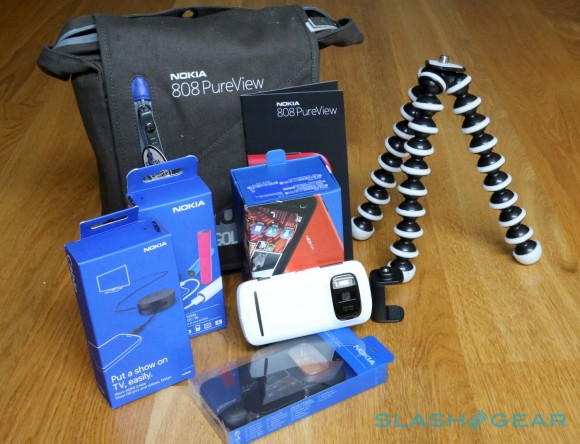
Regardless this deal is pretty nice, through SmartBuy (Jordan's version of BestBuy or hhGregg) if you purchase the Pureview (available in White and Black with red coming soon) you can get a free tripod mount + the tripod itself (the two on the right of the image) for 450 JODs (around $630):
 

You would not believe how hard I've looked for a mobile tripod that is NOT an iPhone and finally this comes around